Olive Young gift card in Korea, where it works and how to use it
Use Olive Young gift cards in stores and online in Korea. In stores, show the card image from a text or the app barcode.
Published · Updated · 6 min read
An Olive Young gift card works at Olive Young stores and on the Olive Young online mall in Korea. In stores, you can show the card image you received by text message as it is, or open the payment barcode in the Olive Young app at the counter. Some stores are excluded, such as stores inside Lotte Mart, NC and NewCore. Olive Young's guide says the card is valid for 5 years from purchase, but the period can differ depending on where the card was sold. You can ask for the remaining balance back after you use at least 60% of the card value, or 80% for cards of 10,000 won or less. Cards received free through events or as prizes cannot be extended, refunded or exchanged. We checked these points in Olive Young's official gift card guide on November 29, 2026.
On Gogyeon, you choose a listing on the open surveys page and answer through the survey form linked in the listing, such as a Google Form. The listings page is in Korean. The MarketPilot team (마켓파일럿 관리팀) sends the reward as a mobile gift card or coupon, under the conditions written in the listing.
If you received an Olive Young gift card as a survey reward, check where it works, how to pay, the balance and the expiry date. The Olive Young menus named below are in Korean, so this guide gives the Korean words too.
Where does an Olive Young gift card work?
| Place | Can you use it? | Check first |
|---|---|---|
| Olive Young stores in Korea | Yes | Whether the store is excluded, such as stores inside Lotte Mart, NC and NewCore |
| Olive Young online mall and app in Korea | Yes | Whether the card is registered under My Page > Gift Card |
| Olive Young Global, the site that ships overseas | Not confirmed | Ask Olive Young Global customer service |
- Olive Young's gift card guide has a full list of excluded stores. Check the store name before you go.
- If your card notice lists its own places of use, follow that notice first.
- According to CJ Olive Networks, its CJ Gift Card can also be used at Olive Young. It is a card for CJ brands, so it also works at places such as CGV and Tous Les Jours.
How do I pay in a store?
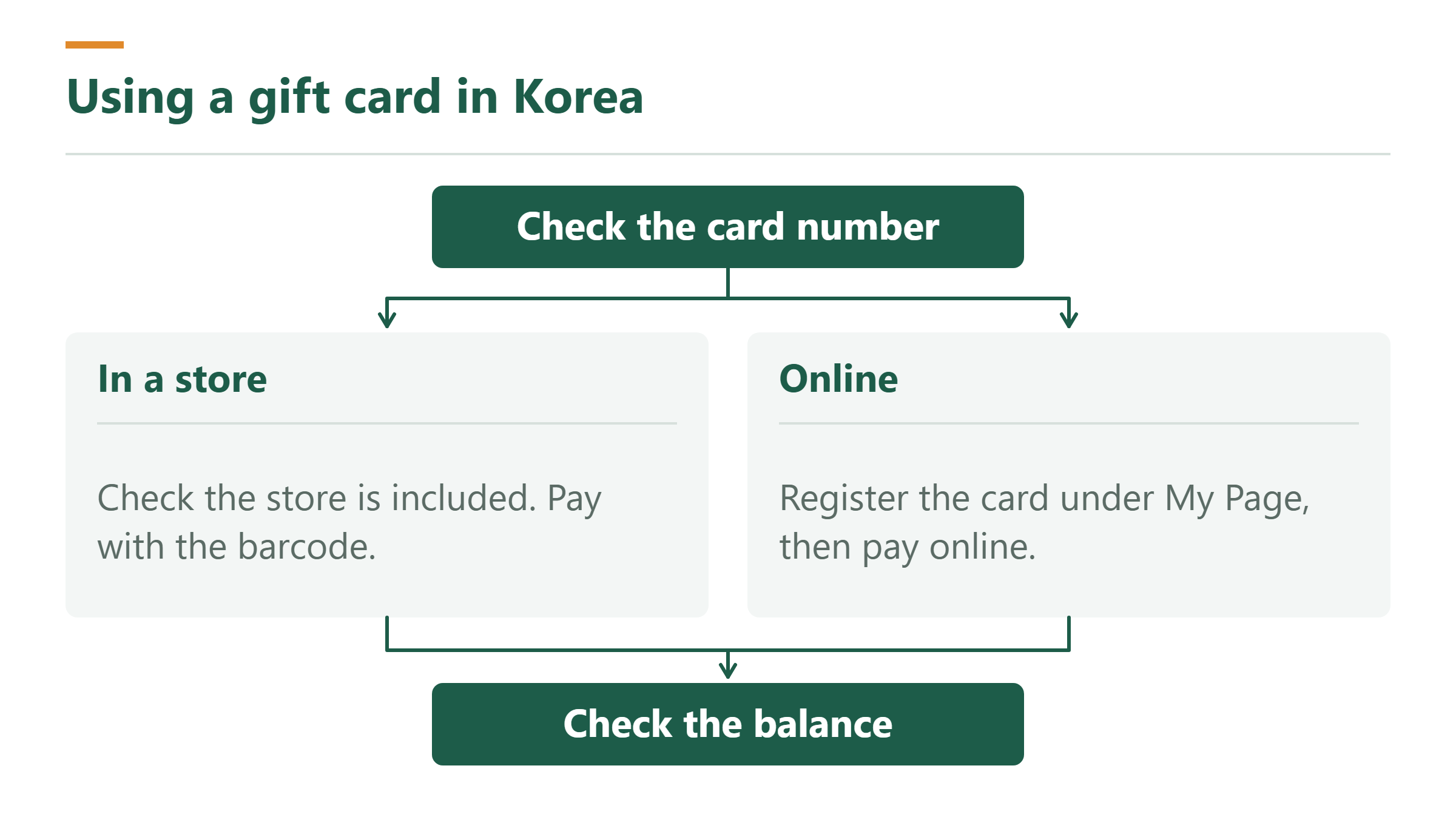
- Card sent to you by text message as a gift: show the card image at the counter as you received it, or register the card online first.
- Card you bought from Olive Young yourself: tap the card under 마이페이지 (My Page) > 기프트카드 (Gift Card) in the app, and the payment barcode appears.
- Olive Young's guide says a screenshot of that payment barcode screen is not accepted, so open the barcode screen in the app when you pay. This is separate from the card image sent to you by text message.
How do I register the card to use it online?
You need to be logged in to an Olive Young account to reach My Page.
- In the Olive Young app or online mall, open 마이페이지 (My Page) > 기프트카드 (Gift Card) > 카드등록 (Register card).
- Enter the 16-digit card number. In the app, you can also scan the card with your camera.
- Type the 6-digit 스크래치 번호 (scratch number) yourself. It is a security code, and on a plastic card it is hidden under the scratch-off area. The guide asks you to type it for security.
- If your number has 22 digits, enter the first 16 digits and the last 6 digits separately.
- If you received a code with letters and numbers, convert it to a gift card in the CJ ONE app first.
- A card number that does not start with 8611 or 8613 may not register.
- A registered card can be chosen at checkout on the online mall, and it can also be used in stores.
- If registration fails or the card does not work, contact CJ ONE customer service.
How do I check the balance?
- Registered cards and gift history are under 마이페이지 (My Page) > 기프트카드 (Gift Card).
- The balance cannot be moved to another card, and a card with a balance left cannot be deleted.
- If you cannot see the balance or are not sure the card is registered, contact CJ ONE customer service.
How long is the card valid, and can I get a refund?
| Item | Olive Young's guide (checked 2026-11-29) |
|---|---|
| Validity | 5 years from purchase, or from the last top-up. It can differ depending on where the card was sold |
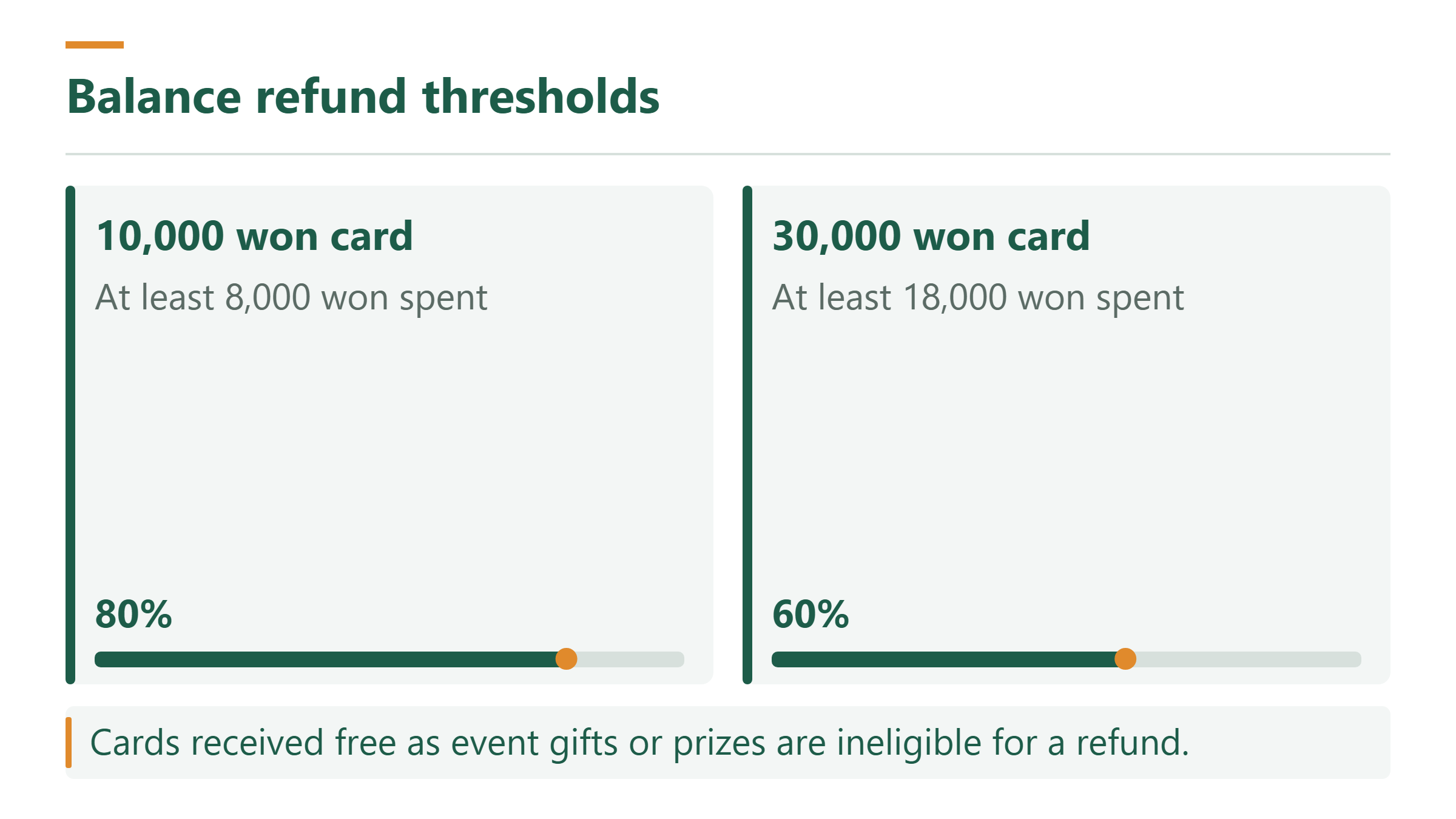
| Balance refund | After you use at least 60% of the card value, or 80% for cards of 10,000 won or less. For a card that was topped up, the total at the last top-up counts |
| Expired card | No payment, refund or exchange |
| Cards received free through events or as prizes | No extension, refund or exchange |
- On a 10,000 won card, you can ask for the balance back after spending at least 8,000 won. On a 30,000 won card, the amount is 18,000 won.
- A card sold through another shop may have a different period. Follow the date printed on your card.
- If your card notice says it is an event or prize card, the refund rule above does not apply, so plan to use it all before it expires.
I got one as a survey reward. What should I check first?
- Expiry date: On Gogyeon, coupon expiry dates differ by product. You can use the coupon until the date shown on it.
- Card type: If the notice says it is an event or prize card, it cannot be extended or refunded.
- Who sends it: On Gogyeon listings, the MarketPilot team (마켓파일럿 관리팀) sends the reward under the conditions written in the listing. The 리워드 (Reward) field on the listing page says what you get and who gets it, and the 지급 (Payout) field says who sends it and by when.
- Phone number or email: Gogyeon listings need no sign-up or login. You leave the contact for the reward in the survey form linked in the listing. Whether it is a phone number or an email address differs by listing, so check the listing's 리워드 (Reward) field and the instructions in the survey form.
- Card numbers: The card number and the 6-digit 스크래치 번호 (scratch number) are used to register the card, so do not send them to anyone.
- Suspicious messages: If someone asks you to install an app, make a payment or pass on a verification code to get a reward, do not do it.
- Leaving Korea: The guide we checked covers Olive Young stores and the online mall in Korea. If you are leaving soon, plan to use the card before you go.
For how survey rewards work in Korea in general, read Paid surveys in Korea and gift card rewards. A Korean version of this topic is at 올리브영 상품권 사용처와 잔액 확인.
Sources
- Olive Young, gift card guide (Korean) · checked 2026-11-29
- Olive Young, gift card product details (Korean) · checked 2026-11-29
- CJ Olive Networks, CJ Gift Card · checked 2026-11-29
Frequently asked questions
- Where can I use an Olive Young gift card?
- At Olive Young stores and on the Olive Young online mall in Korea, according to Olive Young's gift card guide. In stores, you show the card image you received by text message, or the payment barcode in the Olive Young app. Some stores are excluded, such as stores inside Lotte Mart, NC and NewCore.
- How do I register an Olive Young gift card?
- Log in to the Olive Young app or online mall and go to My Page > Gift Card > Register card. Enter the 16-digit card number and the 6-digit security code called 스크래치 번호 (scratch number). For a 22-digit number, enter the first 16 digits and the last 6 digits separately.
- How long is an Olive Young gift card valid?
- Olive Young's guide says 5 years from purchase, or from the last top-up for a card that was topped up. The period can differ depending on where the card was sold, so the date on your card is the one to follow.
- Can I get the remaining balance back?
- Olive Young's guide says you can ask for the balance back after you use at least 60% of the card value, or 80% for cards of 10,000 won or less. Cards received free through events or as prizes cannot be extended, refunded or exchanged.
- Can I use it on Olive Young Global?
- We could not find any statement from Olive Young that these gift cards work on Olive Young Global, the site that ships overseas. Ask Olive Young Global customer service before you count on it.
Steps
- Check the card number and the expiry date in the message you received.
- In a store, show the card image you received by text message, or open the payment barcode in the Olive Young app at the counter.
- To use the card online, register it under My Page > Gift Card > Register card in the Olive Young app and choose it at checkout.
- Check the balance and the expiry date, and use the card before it expires.